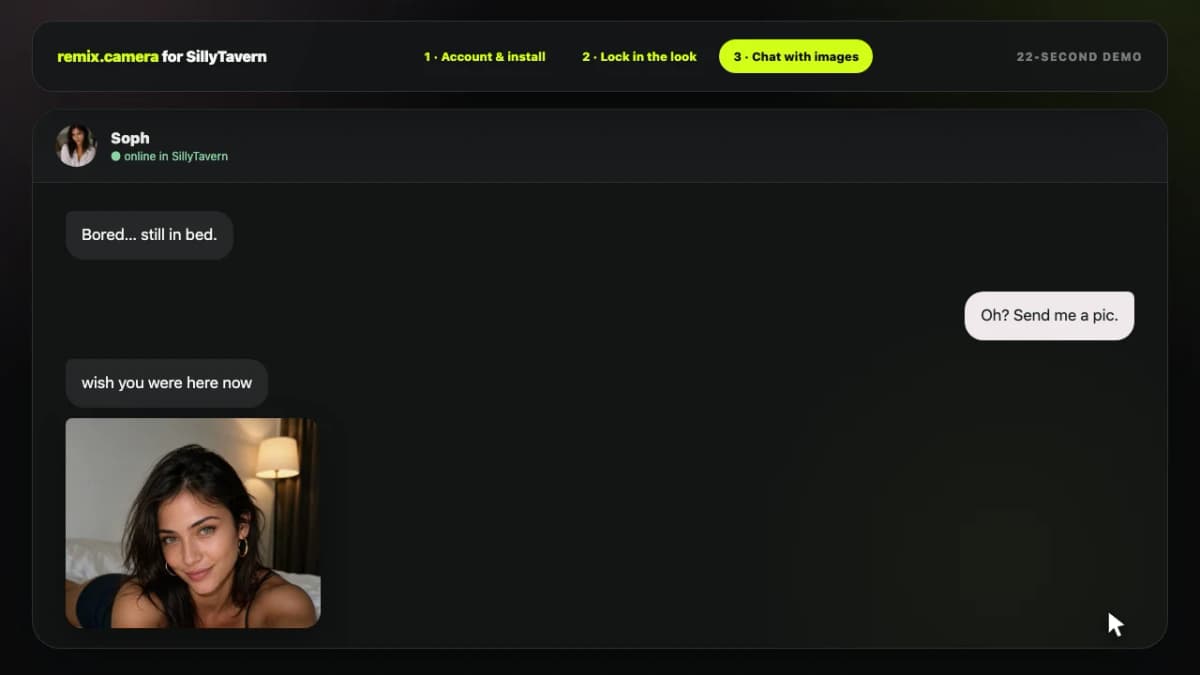
How it works
From one photo to a better chatbot selfie
Your bot sends the request it already understands. Remix handles character identity, prompt-template retrieval, prompt composition, and image-model routing.
Create a character
Upload one photo to start now. Add 10 or more later when you want stronger identity consistency.
Send a natural request
Pass the chatbot request and optional recent messages, such as “send a playful mirror selfie.”
Get a better image
Remix matches a proven prompt template, adapts it to the character, and runs the right image model.
Example flow
Your user asks: “Send me a selfie before you go out.”
Character
Maya starts from one photo
A quick safety check is the only gate. Optional custom LoRA training is available for improved consistency.
Chat request
“Send me a selfie before you go out”
Include recent messages when the image should feel like a natural continuation of the conversation.
Remix result
Matched: Casual mirror selfie
A proven template is adapted to Maya instead of sending a generic one-line prompt to an image model.
One photo is enough to start. Training is an optional consistency upgrade after you add 10 or more photos.
Browse the APIReference
Build with three capabilities
Characters establish identity. Proven Templates turn requests into better prompts. Images return the result.
CharactersStart from one photo; optionally train with 10+ for stronger consistency.
GET/api/v1/design/charactersList your characters
Return the visual characters this API key can use, including safety-check readiness and eligibility for optional training.
Authentication
API key, opaque design session, or Firebase ID token
const response = await fetch("https://remix.camera/api/v1/design/characters", {
headers: {
"Authorization": "Bearer <api-key>"
}
});
const data = await response.json();{
"ok": true,
"characters": [
{
"id": "character_maya",
"name": "Maya",
"photoCount": 1,
"status": "ready",
"readyForGeneration": true,
"training": {
"status": "untrained",
"eligible": false,
"minimumPhotos": 10,
"photoCount": 1
}
}
]
}POST/api/v1/design/charactersCreate a character
Upload one photo to create a reference character without training. It becomes usable after the required safety check. Add more photos and start optional training as separate, explicit operations.
Authentication
API key, opaque design session, or Firebase ID token
import { openAsBlob } from "node:fs";
const formData = new FormData();
formData.append("name", "Maya");
formData.append("subjectType", "person");
formData.append("photo", await openAsBlob("maya.jpg"), "maya.jpg");
const response = await fetch("https://remix.camera/api/v1/design/characters", {
method: "POST",
headers: {
"Authorization": "Bearer <api-key>"
},
body: formData
});
const data = await response.json();{
"ok": true,
"character": {
"id": "character_maya",
"name": "Maya",
"photoCount": 1,
"status": "processing",
"readyForGeneration": false,
"moderation": {
"status": "processing",
"reason": null
},
"training": {
"status": "untrained",
"eligible": false,
"minimumPhotos": 10,
"photoCount": 1
}
}
}GET/api/v1/design/characters/{characterId}Check character readiness
Return one owned character with generation readiness, moderation state, photo count, and optional training eligibility.
Authentication
API key, opaque design session, or Firebase ID token
const response = await fetch("https://remix.camera/api/v1/design/characters/character_maya", {
headers: {
"Authorization": "Bearer <api-key>"
}
});
const data = await response.json();{
"ok": true,
"character": {
"id": "character_maya",
"name": "Maya",
"status": "ready",
"readyForGeneration": true,
"photoCount": 1
}
}POST/api/v1/design/characters/{characterId}/photosAdd character photos
Add reference photos in batches under 4 MB to reach the 10-photo threshold for optional training. Adding photos never starts training by itself.
Authentication
API key, opaque design session, or Firebase ID token
import { openAsBlob } from "node:fs";
const formData = new FormData();
formData.append("photo", await openAsBlob("maya-02.jpg"), "maya-02.jpg");
formData.append("photo", await openAsBlob("maya-03.jpg"), "maya-03.jpg");
const response = await fetch("https://remix.camera/api/v1/design/characters/character_maya/photos", {
method: "POST",
headers: {
"Authorization": "Bearer <api-key>"
},
body: formData
});
const data = await response.json();{
"ok": true,
"character": {
"id": "character_maya",
"photoCount": 3,
"status": "processing",
"readyForGeneration": false,
"moderation": {
"status": "processing",
"reason": null
}
}
}POST/api/v1/design/characters/{characterId}/trainingStart optional training
Explicitly start consistency training after the character has at least 10 photos. The normal one-photo flow does not call this operation.
Authentication
API key, opaque design session, or Firebase ID token
const response = await fetch("https://remix.camera/api/v1/design/characters/character_maya/training", {
method: "POST",
headers: {
"Authorization": "Bearer <api-key>",
"Content-Type": "application/json"
},
body: JSON.stringify({
"idempotencyKey": "train-character-maya-v1"
})
});
const data = await response.json();{
"ok": true,
"training": {
"started": true,
"status": "training",
"requestId": "training_123",
"inProgress": true
}
}Proven TemplatesFind strong, reusable image directions instead of starting from a generic prompt.
GET/api/v1/design/templates?query={query}Search proven templates
Search the Remix prompt library using the same natural phrase your chatbot understands, such as send a playful mirror selfie.
Authentication
API key, opaque design session, or Firebase ID token
const response = await fetch("https://remix.camera/api/v1/design/templates?query=send%20a%20playful%20mirror%20selfie&pageSize=6", {
headers: {
"Authorization": "Bearer <api-key>"
}
});
const data = await response.json();{
"ok": true,
"query": "send a playful mirror selfie",
"templates": [
{
"id": "template_123",
"title": "Casual mirror selfie",
"previewImageUrl": "https://...",
"useCases": ["selfie", "mirror-selfie"],
"match": {
"why": "playful mirror selfie",
"score": 0.94,
"method": "semantic"
}
}
]
}GET/api/v1/design/templates/{templateId}Get template detail
Return the proven prompts, preview images, use cases, and recommended model settings for one template.
Authentication
API key, opaque design session, or Firebase ID token
const response = await fetch("https://remix.camera/api/v1/design/templates/template_123", {
headers: {
"Authorization": "Bearer <api-key>"
}
});
const data = await response.json();{
"ok": true,
"template": {
"id": "template_123",
"title": "Casual mirror selfie",
"previewImageUrl": "https://...",
"prompts": [
{
"index": 0,
"prompt": "A natural phone mirror selfie...",
"recommendedModelId": "nano-banana"
}
]
}
}POST/api/v1/design/templates/style-searchFind similar visual styles
Start from a template and return visually similar proven options when a chatbot or user wants more of the same look.
Authentication
API key, opaque design session, or Firebase ID token
const response = await fetch("https://remix.camera/api/v1/design/templates/style-search", {
method: "POST",
headers: {
"Authorization": "Bearer <api-key>",
"Content-Type": "application/json"
},
body: JSON.stringify({
"templateId": "template_123",
"pageSize": 6
})
});
const data = await response.json();{
"ok": true,
"sourceTemplate": {
"id": "template_123",
"title": "Casual mirror selfie"
},
"templates": [
{
"id": "template_456",
"title": "Getting-ready phone selfie",
"previewImageUrl": "https://..."
}
]
}POST/api/v1/design/prompts/composeCompose a chatbot-ready prompt
Adapt a natural request, recent chat, and optional proven template into one character-aware production prompt without generating an image yet.
Authentication
API key, opaque design session, or Firebase ID token
const response = await fetch("https://remix.camera/api/v1/design/prompts/compose", {
method: "POST",
headers: {
"Authorization": "Bearer <api-key>",
"Content-Type": "application/json"
},
body: JSON.stringify({
"characterId": "character_maya",
"request": "Send a playful mirror selfie before going out",
"templateId": "template_123",
"recentMessages": [
{
"role": "user",
"content": "Are you ready yet?"
},
{
"role": "assistant",
"content": "Almost. Deciding if this outfit is too much."
}
],
"modelId": "auto"
})
});
const data = await response.json();{
"ok": true,
"request": "Send a playful mirror selfie before going out",
"composedPrompt": "A realistic candid phone mirror selfie of Maya...",
"template": {
"id": "template_123",
"title": "Casual mirror selfie"
},
"modelRecommendation": {
"requestedModelId": "auto",
"recommendedModelId": "nano-banana"
}
}ImagesSend one chatbot image request; Remix handles templates, character identity, and routing.
POST/api/v1/design/imagesCreate a contextual character image
The plug-and-play chatbot operation. Send a character, natural request, and optional recent messages. Remix retrieves a proven template when available and falls back cleanly to the request itself.
Authentication
API key, opaque design session, or Firebase ID token
const response = await fetch("https://remix.camera/api/v1/design/images", {
method: "POST",
headers: {
"Authorization": "Bearer <api-key>",
"Idempotency-Key": "chatbot-message-123",
"Content-Type": "application/json"
},
body: JSON.stringify({
"characterId": "character_maya",
"request": "Send a playful mirror selfie before going out",
"recentMessages": [
{
"role": "user",
"content": "Are you ready yet?"
},
{
"role": "assistant",
"content": "Almost. Deciding if this outfit is too much."
}
],
"modelId": "auto"
})
});
const data = await response.json();{
"ok": true,
"image": {
"id": "image_123",
"status": "queued",
"statusUrl": "/api/v1/design/images/image_123",
"requestedModelId": "auto",
"resolvedModelId": "nano-banana",
"creditCost": 1,
"imageUrl": null,
"template": {
"id": "template_123",
"title": "Casual mirror selfie"
}
}
}GET/api/v1/design/images/{imageId}Get image status
Poll the statusUrl returned by image creation until the status is complete and imageUrl is available.
Authentication
API key, opaque design session, or Firebase ID token
const response = await fetch("https://remix.camera/api/v1/design/images/image_123", {
headers: {
"Authorization": "Bearer <api-key>"
}
});
const data = await response.json();{
"ok": true,
"image": {
"id": "image_123",
"status": "completed",
"statusUrl": "/api/v1/design/images/image_123",
"requestedModelId": "nano-banana",
"resolvedModelId": "nano-banana",
"imageUrl": "https://..."
}
}Guides
Integration details when you need them
Authentication
Authentication
Use a user-owned API key for normal chatbot, backend, and automation integrations.
Create a key
Sign in at API Keys, give the key a descriptive label, and copy it when it is shown.
Authorization: Bearer rc_live_<id>.<secret>API keys:
- act as the owning Remix Camera account
- use the same characters, credits, and plan limits as that account
- can be revoked from the API Keys page
- are stored hashed by Remix Camera
The full key is shown only once.
Keep the key on your server
An rc_live_... key is a server secret.
Do not place it in:
- browser JavaScript
- a mobile application bundle
- a public repository
- a chatbot character card
- a client-side plugin setting visible to other users
Store it in an environment variable or secret manager:
export REMIX_API_KEY="rc_live_..."const response = await fetch("https://remix.camera/api/v1/design/characters", {
headers: {
Authorization: `Bearer ${process.env.REMIX_API_KEY}`,
},
});Test the key
GET /characters is the recommended harmless authentication check because it requires a valid credential and does not spend image credits.
curl https://remix.camera/api/v1/design/characters \
-H "Authorization: Bearer $REMIX_API_KEY"Do not use GET /models as an authentication test. Model discovery is public-readable and can succeed when a bearer token is missing or invalid.
Browser applications
First-party browser applications already signed into Remix Camera may use a Firebase ID token:
Authorization: Bearer <firebase-id-token>Do not ask external users to copy Firebase tokens. Use API keys or the supported device-pairing integration instead.
Local clients and device pairing
Supported desktop and local-client integrations can use an opaque user-bound design session:
Authorization: Bearer dapi_<id>.<secret>These sessions are:
- opaque and hashed before storage
- revocable
- limited per user
- intended for device-pairing flows such as the Remix Camera SillyTavern setup command
The device start, approve, poll, session exchange, session listing, and session revoke routes are integration infrastructure. They remain available for current clients but are intentionally not part of the primary chatbot-image API reference.
Key management API compatibility
The existing /api/v1/design/auth/api-keys* routes remain available for Remix Camera's signed-in account UI. They require an interactive Firebase ID token; an API key cannot create or revoke other API keys.
Normal developers should create, inspect, and revoke keys through API Keys.
Errors, Billing, and Limits
Error shape
Primary Character, Template, Prompt, and Image endpoints return:
{
"ok": false,
"error": {
"code": "invalid_request",
"message": "characterId is required",
"retryable": false
}
}When available, error.details contains structured context such as the required photo count or current subscription state.
Error codes
unauthorized— the bearer token is missing, invalid, expired, or revokedforbidden— the account cannot use the requested resource or capabilityinvalid_request— required fields are missing or an unsupported combination was sentnot_found— the owned character, template, or image job could not be foundprofile_not_ready— the selected character cannot yet use the requested modelidempotency_conflict— the key was already used for different request fieldsidempotency_in_progress— the original keyed request is active; retry the identical request with the same key afterRetry-Afteridempotency_indeterminate— the original request may have reached the provider; do not submit a replacement request automaticallyinsufficient_credits— the account does not have enough image creditsmoderated_prompt— the image request was blocked by prompt moderationmoderated_profile— the character is blocked or awaiting required age reviewrate_limited— retry only after theRetry-Afterdurationprovider_unavailable— an image provider is temporarily unavailableinternal_error— an unexpected server-side failure
Retry guidance
Retry only when:
retryableistrue- the code is
rate_limitedand theRetry-Afterdelay has elapsed - the code is
provider_unavailable
Do not automatically retry validation, authentication, moderation, or insufficient-credit failures.
Training accepts idempotencyKey; reuse it when retrying the same training action.
For POST /images, send one stable Idempotency-Key header per logical image request. On a transport timeout or idempotency_in_progress, retry the identical body with the same key after Retry-After. A completed retry replays the original response and does not spend another image credit. Never reuse a key for different request fields or automatically replace an idempotency_indeterminate request with a new key. When a response includes statusUrl, poll that URL instead of submitting the image again.
Character photo rules
- creating a character requires at least one supported image
- one photo creates a reference character that can be used immediately when moderation is clear
- training requires at least 10 photos
- adding photos does not automatically start training
- training must be requested explicitly
- character create/photo batches are capped at 4 MB per request
- character photo uploads remain subject to the current file-type, file-size, moderation, and maximum-photo limits
If train=true is sent to character creation, the request returns invalid_request. Add photos first, wait for safety checks to clear, then call the dedicated training operation.
Image inputs
POST /images accepts JSON and creates exactly one image. It currently rejects local and remote reference-image inputs until source media can pass an affirmative strict age-safety clearance before generation.
Billing and credits
API keys and opaque design sessions are user-bound. API usage draws from the same credits and plan limits as the Remix Camera web application.
Credit-spending operations include:
- image generation and remix
- optional character training
Template search, template detail, prompt composition, character listing, character status, and image-status polling do not spend image-generation credits. Prompt composition may still be subject to service rate limits.
There is not currently a separate API-only billing balance.
Model selection
Use modelId: "auto" unless your integration needs a specific supported model. Image responses distinguish the requested and resolved model:
{
"requestedModelId": "auto",
"resolvedModelId": "nano-banana"
}Compatibility routes
Older /profiles, /packs, /generations, /remix-from-image, and integration-auth routes remain available. Some preserve legacy error bodies for existing clients. New integrations should use the primary Character, Template, Prompt, and Image endpoints for the normalized error contract above.
Chatbot Image Quickstart
This guide adds consistent, contextual images to an existing chatbot.
The complete flow is:
- create a visual character from one photo
- poll the character until its required safety check is complete
- send the same natural image request your chatbot already understands, then poll its status URL
Remix Camera handles prompt-template retrieval, character identity, prompt adaptation, and image-model routing.
Before you start
Create an API key at API Keys and store it only on your server.
export REMIX_API_KEY="rc_live_..."API requests use:
Authorization: Bearer <api-key>1. Create a character from one photo
One photo creates a reference character without training. It becomes usable after the required safety check.
curl -X POST https://remix.camera/api/v1/design/characters \
-H "Authorization: Bearer $REMIX_API_KEY" \
-F "name=Maya" \
-F "subjectType=person" \
-F "[email protected]"The response includes the character id needed for image requests:
{
"ok": true,
"character": {
"id": "character_maya",
"name": "Maya",
"photoCount": 1,
"status": "processing",
"readyForGeneration": false,
"moderation": {
"status": "processing",
"reason": null
},
"training": {
"status": "untrained",
"eligible": false,
"minimumPhotos": 10,
"photoCount": 1
}
}
}For a person character, the upload returns immediately while the required safety check runs. Poll the character before generating:
curl https://remix.camera/api/v1/design/characters/character_maya \
-H "Authorization: Bearer $REMIX_API_KEY"Continue when readyForGeneration is true. A blocked moderation state requires review and must not be retried as generation.
2. Ask for an image naturally
Send the request and, when helpful, the recent conversation. You do not need to search templates or write an image-model prompt first.
curl -X POST https://remix.camera/api/v1/design/images \
-H "Authorization: Bearer $REMIX_API_KEY" \
-H "Idempotency-Key: chatbot-message-123" \
-H "Content-Type: application/json" \
-d '{
"characterId": "character_maya",
"request": "Send a playful mirror selfie before going out",
"recentMessages": [
{ "role": "user", "content": "Are you ready yet?" },
{ "role": "assistant", "content": "Almost. Deciding if this outfit is too much." }
],
"modelId": "auto"
}'The image operation returns immediately with a status URL:
{
"ok": true,
"image": {
"id": "image_123",
"status": "queued",
"statusUrl": "/api/v1/design/images/image_123",
"requestedModelId": "auto",
"resolvedModelId": "nano-banana",
"creditCost": 1,
"imageUrl": null,
"template": {
"id": "template_123",
"title": "Casual mirror selfie"
}
}
}When a proven template matches the request, the response identifies it. When none matches, Remix Camera falls back to the natural request instead of blocking the image.
Use one stable Idempotency-Key for each logical image request. If the connection times out, retry the identical request with the same key. Never reuse that key for different request fields.
3. Poll the image
Use the returned statusUrl:
curl https://remix.camera/api/v1/design/images/image_123 \
-H "Authorization: Bearer $REMIX_API_KEY"Stop polling when status is completed or a terminal error state is returned.
{
"ok": true,
"image": {
"id": "image_123",
"status": "completed",
"statusUrl": "/api/v1/design/images/image_123",
"resolvedModelId": "nano-banana",
"imageUrl": "https://..."
}
}Optional: inspect the prompt library
Your chatbot can search the same proven template library directly:
curl "https://remix.camera/api/v1/design/templates?query=send%20a%20playful%20mirror%20selfie&pageSize=6" \
-H "Authorization: Bearer $REMIX_API_KEY"Use this when you want to show template choices, previews, or matching explanations before generation. It is not required for the one-call /images flow.
Optional: compose without generating
Use prompt composition when your application wants to review or edit the final prompt before spending image credits:
curl -X POST https://remix.camera/api/v1/design/prompts/compose \
-H "Authorization: Bearer $REMIX_API_KEY" \
-H "Content-Type: application/json" \
-d '{
"characterId": "character_maya",
"request": "Send a playful mirror selfie before going out",
"templateId": "template_123",
"modelId": "auto"
}'Prompt composition can use the existing enhancement service, so call it only when the composed prompt is itself useful to your application. The normal /images operation does not add this extra prompt-composition call.
Optional: train for stronger consistency
Add photos until the character has at least 10. Keep each request under 4 MB and repeat the call in small batches when needed:
curl -X POST https://remix.camera/api/v1/design/characters/character_maya/photos \
-H "Authorization: Bearer $REMIX_API_KEY" \
-F "[email protected]" \
-F "[email protected]"Adding photos does not start training. Start it explicitly when ready:
curl -X POST https://remix.camera/api/v1/design/characters/character_maya/training \
-H "Authorization: Bearer $REMIX_API_KEY" \
-H "Content-Type: application/json" \
-d '{
"idempotencyKey": "train-character-maya-v1"
}'Training uses the account's existing Remix Camera training entitlement. Reuse the same idempotency key when retrying the same training action.
Recommended chatbot behavior
Treat the request as the image behavior the character is performing, not a low-level model prompt.
Good requests include:
Send a casual morning selfie from the kitchenShow what you would wear on this dateSend a reaction image that fits the last messageRecreate this vacation photo with my character
Include recent messages only when they provide useful scene, outfit, mood, or relationship context. Do not send an entire private conversation when a few relevant messages are enough.